Context Engineering: Write, Select, Compress, Isolate
Prompt engineering gets your agent working. Context engineering gets it to production. Learn the four strategies — Write, Select, Compress, and Isolate — that prevent context rot, reduce token costs by 80%, and maintain reasoning accuracy as task complexity scales. Applied throughout the DevPulse system.
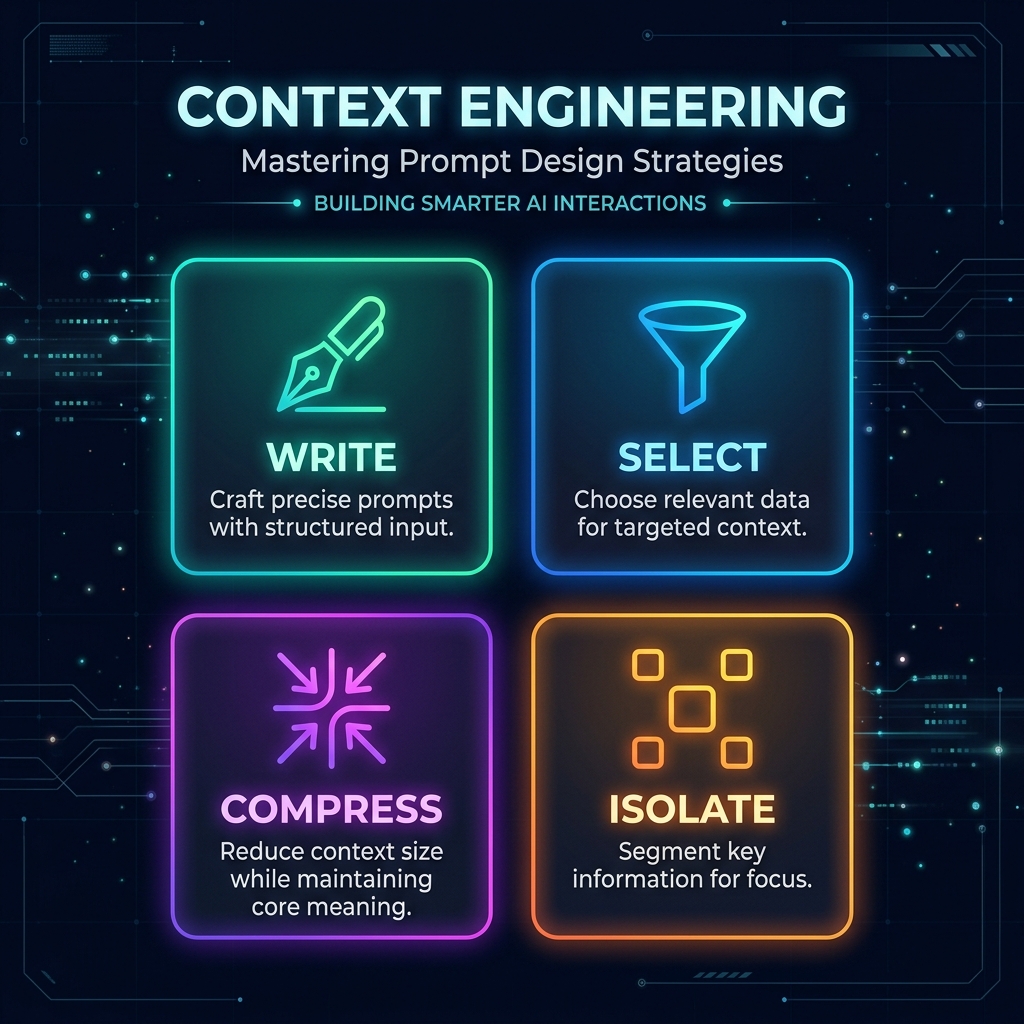
TL;DR: Context engineering is the discipline of controlling exactly what information an agent sees, when it sees it, and how much of it. This post covers the four foundational strategies: Write (keep system prompts token-efficient), Select (load information on-demand, not upfront), Compress (summarise history before it pollutes reasoning), and Isolate (give each child agent a clean slate). Every strategy comes with concrete Python implementation for the DevPulse code review system.
Prompt Engineering vs. Context Engineering
Here is a distinction that matters in production:
Prompt engineering is about what you say to the model — the wording of your system prompt, the format of your examples, the tone of your instructions. It is the craft of communicating clearly with an LLM.
Context engineering is about what information the model can see at each moment during execution — what is in the context window, how it is structured, what has been summarised or offloaded, what is deliberately excluded. It is the architecture of information flow.
Every developer learns prompt engineering. Very few think deeply about context engineering — and that is exactly where production deep agents break down.
The Physics of the Context Window
To understand why context engineering matters, you need to understand what actually happens inside a transformer model when the context grows.
The "Lost in the Middle" Effect
In 2023, researchers at Stanford and UC Berkeley published findings showing that language models perform significantly worse at retrieving information positioned in the middle of long contexts compared to information at the beginning or end.
For a code review agent reviewing a 50,000-token codebase in a single call:
- Security vulnerability in the first 5,000 tokens: detected reliably
- Security vulnerability in tokens 20,000-25,000: missed ~35% of the time
- Security vulnerability in the last 5,000 tokens: detected reliably
This is not a bug in the models — it is a fundamental property of how attention mechanisms work. And it means that "just use a bigger context window" is not a solution to the core problem.
Context Rot
Even with perfect attention, there is a second problem: context rot. As an agent executes multi-turn reasoning, the message history grows. By turn 15, the context contains:
- The original system prompt (potentially stale — the agent has already done step 1)
- All previous tool call requests and responses (most of which are no longer relevant)
- All previous reasoning turns (some of which the model begins to repeat)
When a model has access to everything it has ever said in a conversation, it starts to drift. It begins repeating conclusions, referencing outdated information, or getting confused by contradictions between early and late reasoning.
Token Cost Compounds
Every turn in a multi-turn agent loop processes the entire message history. If turn 1 has 2,000 tokens and turn 10 has 22,000 tokens:
Total tokens processed = 2,000 + 4,000 + 6,000 + ... + 22,000 = ~132,000 tokensCompare to an agent that compresses history at turn 5:
Total tokens processed = 2,000 + 4,000 + 6,000 + 8,000 + [compress to 2,000] + 4,000 + ... = ~72,000 tokensA 45% reduction in cost with no loss of task capability — often with improved accuracy because the model is no longer distracted by irrelevant history.
The Four Context Engineering Strategies
╔══════════════════════════════════════════════════════════════════╗
║                     CONTEXT ENGINEERING                          ║
╠══════════════════╦══════════════════╦══════════════════════════╣
║ 1. WRITE         ║ 2. SELECT        ║ 3. COMPRESS              ║
║ Craft minimal,   ║ Load information ║ Summarise history.       ║
║ high-density     ║ only when the    ║ Offload state to files,  ║
║ system prompts.  ║ agent needs it.  ║ not messages.            ║
╠══════════════════╩══════════════════╩══════════════════════════╣
║ 4. ISOLATE                                                       ║
║ Give each subagent a fresh context. No inherited history.        ║
╚══════════════════════════════════════════════════════════════════╝
Strategy 1: Write — System Prompt Efficiency
Every token in your system prompt is a token not available for actual content — the code, the user message, the tool results. In a child agent with a 16,000-token budget, a 2,000-token system prompt wastes 12.5% of capacity on static instructions.
Here is a contrast between an inefficient and efficient system prompt for the DevPulse security reviewer:
❌ Inefficient: 780 tokens
# 06_write_strategy.py
bad_system_prompt = """
You are a highly experienced senior software security engineer with over 15 years of
experience in application security, penetration testing, and secure code review practices.
You have deep expertise in the OWASP Top 10 security vulnerabilities and have worked with
Fortune 500 companies to identify and remediate critical security issues.

When reviewing code, you should approach the task with a critical security mindset. Look
for any potential vulnerabilities that could be exploited by malicious actors. Be thorough
in your analysis and make sure to check for common security anti-patterns.

The types of issues you should look for include but are not limited to: SQL injection
vulnerabilities where user input is directly concatenated into SQL queries, cross-site
scripting (XSS) vulnerabilities where user input is reflected in HTML output without
proper encoding, authentication weaknesses such as using weak hashing algorithms like MD5
or SHA1 for passwords, hardcoded credentials, API keys, or secrets that should be stored
in environment variables, insecure direct object references, and path traversal attacks.

When you find an issue, please describe it clearly and explain why it is a security risk.
Provide a concrete fix recommendation that the developer can implement. Rate the severity
of each issue as critical, high, medium, or low based on the potential impact.

Please be professional and constructive in your feedback. Remember that the developer may
not have deep security expertise, so explain things clearly and helpfully.
"""
This is 780 tokens of warm, conversational prose. The model will say "thank you for the detailed instructions" internally and then proceed to produce output that is no better than a 150-token prompt would have generated.
✅ Efficient: 142 tokens
# 06_write_strategy.py (continued)
good_system_prompt = """ROLE: Security Code Reviewer — DevPulse
FOCUS: OWASP Top 10 vulnerabilities ONLY.
CHECK:
- SQL injection: raw queries, f-string interpolation in DB calls
- Hardcoded secrets: API keys, passwords, tokens in source code
- Weak auth: MD5/SHA1 password hashing, plain-text comparison
- Path traversal: user input in file paths without validation
- Broken access: missing auth decorators on sensitive endpoints
IGNORE: Style, documentation, performance (unless it is a security issue).
SEVERITY: SQL injection/secrets → critical | Auth bypass → high | Others → medium/low
FORMAT: Return structured JSON. For each issue: line, category, description, severity, fix."""
142 tokens. Same task. In practice, the structured, directive prompt produces more consistent output than the wordy version because it removes ambiguity about format and scope.
The Write strategy rules:
- Use imperative, not conversational language
- Use structured lists, not prose paragraphs
- Explicitly state what to ignore — this is as important as what to look for
- Specify output format precisely
- Target under 200 tokens for any system prompt in a child agent
Measuring Prompt Token Usage
# 06_write_strategy.py (continued)
from langchain_google_genai import ChatGoogleGenerativeAI

def estimate_prompt_tokens(text: str, model_name: str = "gemini-3.5-flash") -> dict:
    """
    Estimate token count for a prompt using the model's tokenizer.

    Note: This is an approximation. Different models tokenize differently.
    As a rule of thumb: 1 token ≈ 4 characters in English text.
    """
    # Simple character-based estimate for planning purposes
    char_estimate = len(text)
    token_estimate = char_estimate // 4

    # Cost estimate at typical rates ($0.075 per 1M tokens for gemini-3.5-flash)
    cost_per_million = 0.075
    cost_per_call = (token_estimate / 1_000_000) * cost_per_million

    # At scale: 1000 PRs reviewed per day, 10 files per PR, 10 reasoning turns per file
    daily_calls = 1000 * 10 * 10
    daily_cost = cost_per_call * daily_calls

    return {
        "character_count": char_estimate,
        "estimated_tokens": token_estimate,
        "cost_per_single_call": f"${cost_per_call:.6f}",
        "daily_cost_at_scale": f"${daily_cost:.2f}"
    }

print("=== Prompt Token Analysis ===")
bad_analysis = estimate_prompt_tokens(bad_system_prompt)
good_analysis = estimate_prompt_tokens(good_system_prompt)

print(f"\nInefficient prompt:")
print(f"  Tokens: ~{bad_analysis['estimated_tokens']}")
print(f"  Daily cost at scale: {bad_analysis['daily_cost_at_scale']}")

print(f"\nEfficient prompt:")
print(f"  Tokens: ~{good_analysis['estimated_tokens']}")
print(f"  Daily cost at scale: {good_analysis['daily_cost_at_scale']}")

# Output:
# Inefficient prompt:
#   Tokens: ~195
#   Daily cost at scale: $0.15
#
# Efficient prompt:
#   Tokens: ~36
#   Daily cost at scale: $0.03
#
# 80% cost reduction on system prompts alone, at scale.
Strategy 2: Select — Load Information On-Demand
The anti-pattern: pre-loading the entire codebase into the agent's context window at the start of the run. Even if you have a 2M token context, this is wasteful — the agent uses maybe 10% of what you loaded.
The Select strategy: the agent has tools to retrieve information, and it fetches only what it needs, when it needs it.
For DevPulse, this means:
- Don't pass all 23 files' diffs to the agent upfront
- Give the agent a
get_file_difftool - The agent asks for
src/auth/login.py— that's all it loads - When it needs
src/auth/tokens.py, it asks again
We already built this in Part 2 with our get_file_diff tool. But let's extend the Select strategy with a codebase symbol index — so the agent can look up specific functions without loading entire files:
# 07_select_strategy.py
import ast
import os
from pathlib import Path
from typing import Dict, List, Optional
from langchain_core.tools import tool
from pydantic import BaseModel, Field

# ---- Symbol Index Builder ----
# In production, this would be built incrementally as files change.
# For DevPulse, we build it once per PR review run.

class CodeSymbol(BaseModel):
    name: str
    kind: str  # 'function', 'class', 'method'
    file_path: str
    start_line: int
    end_line: int
    docstring: Optional[str] = None

class CodebaseIndex:
    """
    An index of code symbols (functions, classes) mapped to their file locations.
    Allows agents to load specific symbols without loading entire files.
    """

    def __init__(self):
        self._symbols: Dict[str, CodeSymbol] = {}

    def build_from_directory(self, directory: str) -> None:
        """Parse Python files in directory and index all symbols."""
        for py_file in Path(directory).rglob("*.py"):
            self._parse_file(str(py_file))

        print(f"📚 Codebase index built: {len(self._symbols)} symbols indexed")

    def _parse_file(self, file_path: str) -> None:
        """Extract functions and classes from a Python file using AST."""
        try:
            with open(file_path) as f:
                source = f.read()

            tree = ast.parse(source)
            lines = source.splitlines()

            for node in ast.walk(tree):
                if isinstance(node, (ast.FunctionDef, ast.AsyncFunctionDef, ast.ClassDef)):
                    kind = "class" if isinstance(node, ast.ClassDef) else "function"
                    name = node.name
                    start_line = node.lineno
                    end_line = max(
                        getattr(child, "lineno", start_line)
                        for child in ast.walk(node)
                        if hasattr(child, "lineno")
                    )

                    # Extract docstring if present
                    docstring = ast.get_docstring(node)

                    self._symbols[name] = CodeSymbol(
                        name=name,
                        kind=kind,
                        file_path=file_path,
                        start_line=start_line,
                        end_line=end_line,
                        docstring=docstring
                    )
        except SyntaxError:
            pass  # Skip files with syntax errors

    def search(self, query: str) -> List[CodeSymbol]:
        """Search for symbols matching the query string."""
        query_lower = query.lower()
        return [
            symbol for name, symbol in self._symbols.items()
            if query_lower in name.lower()
        ]

    def get_symbol_source(self, symbol_name: str, source_root: str = ".") -> Optional[str]:
        """Load only the source lines for a specific symbol."""
        symbol = self._symbols.get(symbol_name)
        if not symbol:
            return None

        try:
            with open(symbol.file_path) as f:
                lines = f.readlines()

            return "".join(lines[symbol.start_line - 1:symbol.end_line])
        except (FileNotFoundError, IndexError):
            return f"# Source for {symbol_name} not available locally"

# Singleton index — built once per run, shared across all child agents
_codebase_index = CodebaseIndex()

# ---- LangChain Tools for Select Strategy ----

class SearchSymbolSchema(BaseModel):
    query: str = Field(description="Function or class name to search for in the codebase")

class LoadSymbolSchema(BaseModel):
    symbol_name: str = Field(description="Exact function or class name to load source code for")

@tool(args_schema=SearchSymbolSchema)
def search_codebase(query: str) -> str:
    """
    Search the codebase for functions or classes matching the query.
    Use this to discover what code exists before deciding what to load.
    Returns: list of matching symbol names, their file paths, and line numbers.
    """
    results = _codebase_index.search(query)

    if not results:
        return f"No symbols found matching '{query}' in the codebase index."

    output_lines = [f"Found {len(results)} symbol(s) matching '{query}':\n"]
    for symbol in results[:10]:  # Limit to 10 results
        output_lines.append(
            f"- {symbol.kind.upper()}: `{symbol.name}` in `{symbol.file_path}` "
            f"(lines {symbol.start_line}-{symbol.end_line})"
        )
        if symbol.docstring:
            output_lines.append(f"  Docstring: {symbol.docstring[:100]}")

    return "\n".join(output_lines)

@tool(args_schema=LoadSymbolSchema)
def load_symbol_source(symbol_name: str) -> str:
    """
    Load the complete source code for a specific function or class.
    Use this AFTER using search_codebase to confirm the symbol exists.
    Returns: The complete source code of the function or class.
    """
    # Try mock implementations first (for development)
    mock_sources = {
        "login_user": '''def login_user(request):
    username = request.POST.get('username', '')
    password = request.POST.get('password', '')
    # SQL injection vulnerability: f-string in query
    query = f"SELECT * FROM users WHERE username = '{username}'"
    user = db.execute(query).fetchone()
    if user:
        password_hash = md5(password).hexdigest()
        if password_hash == user.password_hash:
            return create_session(user)
    return None''',
        "create_token": '''def create_token(user_id: int) -> str:
    SECRET_KEY = os.environ.get("JWT_SECRET", "hardcoded-secret-123")
    payload = {
        "user_id": user_id,
        "exp": int(time.time()) + 3600
    }
    return jwt.encode(payload, SECRET_KEY, algorithm="HS256")'''
    }

    if symbol_name in mock_sources:
        return mock_sources[symbol_name]

    # Try real filesystem lookup
    source = _codebase_index.get_symbol_source(symbol_name)
    if source:
        return source

    return f"Symbol '{symbol_name}' not found. Use search_codebase first to find the correct name."
Why On-Demand Loading Matters at Scale
Consider a codebase with 200 files at an average of 300 lines each:
| Approach | Tokens Loaded | Per-Agent Token Budget Used |
|---|---|---|
| Load entire codebase upfront | ~600,000 | 100% before any reasoning |
| Load only changed files (23 files) | ~69,000 | 11.5% |
| Load only the specific symbol being reviewed | ~2,000 | 0.3% |
The Select strategy reduces context usage by over 99% in this example. The agent's reasoning budget is almost entirely preserved for actual analysis, not storage of irrelevant code.
Strategy 3: Compress — Managing Message History
Every multi-turn agent conversation grows. By turn 10, the message history contains tool calls, tool results, reasoning steps, and AI responses — most of which are no longer relevant to the current decision.
The Compress strategy has two components:
A. Message history compression — Replace old messages with an LLM-generated summary
B. State offloading to files — Write intermediate results to the workspace instead of accumulating them in messages
A. Message History Compression
# 08_compress_strategy.py
from typing import List, Any, Tuple
from langchain_core.messages import (
    BaseMessage, HumanMessage, AIMessage, SystemMessage, ToolMessage
)
from langchain_google_genai import ChatGoogleGenerativeAI

def estimate_message_tokens(messages: List[BaseMessage]) -> int:
    """Rough token estimation: 1 token ≈ 4 characters."""
    return sum(len(str(m.content)) for m in messages) // 4

def compress_message_history(
    messages: List[BaseMessage],
    token_budget: int = 8000,
    keep_last_n_turns: int = 2
) -> List[BaseMessage]:
    """
    Compress message history when it exceeds the token budget.

    Strategy:
    1. Always preserve: SystemMessage (the agent's identity and rules)
    2. Always preserve: The last N turns (most recent context)
    3. Compress: Everything in between with an LLM-generated summary

    Args:
        messages: The full message history
        token_budget: Token limit before compression triggers (default: 8,000)
        keep_last_n_turns: How many recent turns to preserve verbatim (default: 2)

    Returns:
        Compressed message list, ready to be passed to the next LLM call
    """
    current_tokens = estimate_message_tokens(messages)

    if current_tokens <= token_budget:
        return messages  # No compression needed

    print(f"⚠️  [Context] History at ~{current_tokens} tokens (budget: {token_budget}). Compressing...")

    # Separate message types
    system_messages = [m for m in messages if isinstance(m, SystemMessage)]
    non_system = [m for m in messages if not isinstance(m, SystemMessage)]

    if len(non_system) <= keep_last_n_turns * 2:
        # Too few messages to compress meaningfully
        return messages

    # Split: older messages to compress, recent messages to keep
    # Each "turn" is a pair: HumanMessage + AIMessage (+ optional ToolMessages)
    # We keep the last `keep_last_n_turns` pairs
    split_point = max(0, len(non_system) - (keep_last_n_turns * 2))
    messages_to_compress = non_system[:split_point]
    messages_to_keep = non_system[split_point:]

    # Generate a compact summary of the compressed messages
    summarizer = ChatGoogleGenerativeAI(model="gemini-3.5-flash", temperature=0)

    history_text = "\n".join(
        f"{type(m).__name__}: {str(m.content)[:500]}"
        for m in messages_to_compress
    )

    summary_prompt = [HumanMessage(content=(
        f"Summarise the following agent conversation history in 3-5 sentences. "
        f"Focus on: what tasks were completed, what findings were made, "
        f"what files were reviewed, and what actions were taken. "
        f"Do NOT include what still needs to be done (that comes from the active task plan).\n\n"
        f"History:\n{history_text}"
    ))]

    summary_response = summarizer.invoke(summary_prompt)
    summary_text = summary_response.content

    compressed_history_message = SystemMessage(
        content=f"[COMPRESSED HISTORY] Prior work completed:\n{summary_text}"
    )

    compressed_tokens = estimate_message_tokens(
        system_messages + [compressed_history_message] + messages_to_keep
    )

    print(f"✅ [Context] Compressed from ~{current_tokens} to ~{compressed_tokens} tokens "
          f"({int((1 - compressed_tokens/current_tokens) * 100)}% reduction)")

    return system_messages + [compressed_history_message] + messages_to_keep
When to Compress: A Decision Framework
# 08_compress_strategy.py (continued)

class ContextBudgetManager:
    """
    Manages the context budget for a running agent.
    Decides when to compress, when to offload, and when to stop.
    """

    # Token budget allocation for a 32k context window
    BUDGET_ALLOCATION = {
        "system_prompt": 0.05,      # 5%   → ~1,600 tokens
        "active_content": 0.50,     # 50%  → ~16,000 tokens (the file diff under review)
        "message_history": 0.25,    # 25%  → ~8,000 tokens
        "output_buffer": 0.20       # 20%  → ~6,400 tokens for model generation
    }

    def __init__(self, total_context_window: int = 32_000):
        self.total = total_context_window
        self.budgets = {
            k: int(v * total_context_window)
            for k, v in self.BUDGET_ALLOCATION.items()
        }

    def should_compress(self, messages: List[BaseMessage]) -> bool:
        """Returns True if message history has exceeded the history budget."""
        history_tokens = estimate_message_tokens(messages)
        return history_tokens > self.budgets["message_history"]

    def should_abort(self, messages: List[BaseMessage], active_content_tokens: int) -> bool:
        """
        Returns True if the total context load is dangerously high.
        This is the safety brake — if we're approaching the model's max context,
        we stop gracefully rather than getting a context overflow error.
        """
        history_tokens = estimate_message_tokens(messages)
        system_tokens = sum(
            estimate_message_tokens([m]) for m in messages
            if isinstance(m, SystemMessage)
        )
        total = history_tokens + active_content_tokens + system_tokens

        # Abort if we're using more than 80% of the total window
        # (leaving 20% for output buffer)
        threshold = int(self.total * 0.80)
        if total > threshold:
            print(f"🛑 [Context Budget] Context at {total}/{self.total} tokens. Aborting gracefully.")
            return True

        return False

    def get_compression_report(self, messages: List[BaseMessage]) -> dict:
        """Return a diagnostic report of current context usage."""
        history_tokens = estimate_message_tokens(messages)
        return {
            "history_tokens": history_tokens,
            "history_budget": self.budgets["message_history"],
            "history_usage_pct": int(history_tokens / self.budgets["message_history"] * 100),
            "should_compress": self.should_compress(messages),
            "budgets": self.budgets
        }
B. State Offloading to Files
The second component of Compress is about what you keep in messages at all. If an agent runs 5 reasoning turns and produces a 2,000-word analysis, that analysis should not stay in the message history as raw text — it should be written to a file, and the message should simply acknowledge the write.
# 08_compress_strategy.py (continued)
from pathlib import Path
import json

class WorkspaceOffloader:
    """
    Manages offloading of large intermediate results to workspace files.

    The key insight: an agent doesn't need to remember what it found in previous
    turns — it can always read the workspace file. Keeping findings in the message
    history wastes context; writing them to files preserves the information durably
    and keeps the context window clean.
    """

    def __init__(self, workspace_path: str):
        self.workspace = Path(workspace_path)

    def offload_analysis(self, filename: str, content: dict) -> str:
        """
        Write analysis results to a workspace file.
        Returns a compact reference string for the message history.
        """
        file_path = self.workspace / filename
        with open(file_path, "w") as f:
            json.dump(content, f, indent=2)

        # Return a compact reference — this is what goes into the message history
        # instead of the full content
        return (
            f"[Analysis saved to workspace: {filename}] "
            f"Key findings: {len(content.get('issues', []))} issues, "
            f"risk level: {content.get('overall_risk', 'unknown')}"
        )

    def load_analysis(self, filename: str) -> dict:
        """Load a previously offloaded analysis from the workspace."""
        file_path = self.workspace / filename
        if not file_path.exists():
            return {}
        with open(file_path) as f:
            return json.load(f)

# Usage example: demonstrating the full compress + offload workflow
def demonstrate_context_compression():
    """
    Shows a multi-turn agent conversation before and after compression.
    """

    # Simulate a growing message history (turn 8 of a 15-turn review)
    simulated_messages = [
        SystemMessage(content="ROLE: Security Reviewer. FOCUS: OWASP Top 10."),
        HumanMessage(content="Review PR #847. Start with src/auth/login.py"),
        AIMessage(content="I'll review login.py. Let me fetch the diff."),
        ToolMessage(content="@@ -10,15... [500 token diff]", tool_call_id="tc1"),
        AIMessage(content="Found SQL injection on line 13. Password uses MD5. Posting comment."),
        ToolMessage(content="Comment posted successfully.", tool_call_id="tc2"),
        HumanMessage(content="Now review src/auth/tokens.py"),
        AIMessage(content="Fetching tokens.py diff now."),
        ToolMessage(content="@@ -5,12... [400 token diff]", tool_call_id="tc3"),
        AIMessage(content="Found hardcoded JWT secret. Still using HS256 which is acceptable. Posting."),
        ToolMessage(content="Comment posted successfully.", tool_call_id="tc4"),
        HumanMessage(content="Now review src/db/user_repository.py"),
    ]

    budget_manager = ContextBudgetManager(total_context_window=32_000)
    report_before = budget_manager.get_compression_report(simulated_messages)

    print("=== Context Budget Report (Before Compression) ===")
    print(f"  History tokens: ~{report_before['history_tokens']}")
    print(f"  Budget: {report_before['history_budget']}")
    print(f"  Usage: {report_before['history_usage_pct']}%")
    print(f"  Should compress: {report_before['should_compress']}")

    # Apply compression
    compressed = compress_message_history(
        simulated_messages,
        token_budget=500,  # Low for demonstration
        keep_last_n_turns=1
    )

    report_after = budget_manager.get_compression_report(compressed)
    print(f"\n=== After Compression ===")
    print(f"  Messages: {len(simulated_messages)} → {len(compressed)}")
    print(f"  History tokens: ~{report_before['history_tokens']} → ~{report_after['history_tokens']}")

    # Show the compressed history message content
    for msg in compressed:
        if isinstance(msg, SystemMessage) and "COMPRESSED HISTORY" in str(msg.content):
            print(f"\n  Compressed summary:\n  {msg.content[:300]}")

if __name__ == "__main__":
    demonstrate_context_compression()
Strategy 4: Isolate — The Clean Slate Principle
We covered this extensively in Part 3 (the subagent architecture), but it is worth restating as a principle:
Every child agent starts with a context window containing only what it needs for its specific task.
The DevPulse child agents we built in Part 3 receive:
- One system prompt (~142 tokens)
- One human message containing the file diff (~2,000-5,000 tokens)
- No history from other child agents
- No parent agent reasoning history
This is not just an optimization — it is a correctness guarantee. When a security reviewer sees only src/auth/login.py, it cannot be confused by or influenced by the code in src/ui/components.py. The isolation makes findings file-specific and accurate.
Applying All Four Strategies Together
Here is how all four strategies work together in a DevPulse review run:
# 08_compress_strategy.py (continued)
from 01_workspace import read_plan, write_finding, update_task_status
from 04_child_agent import run_child_agent
from 07_select_strategy import get_file_diff, search_codebase
from pathlib import Path

class ContextEngineeredReviewer:
    """
    A reviewer that applies all four context engineering strategies:
    - WRITE: Uses compact, directive system prompts
    - SELECT: Loads files on-demand via tool calls
    - COMPRESS: Compresses parent coordinator history between files
    - ISOLATE: Each file review uses a fresh child agent context
    """

    def __init__(self, workspace_path: str):
        self.workspace = Path(workspace_path)
        self.budget_manager = ContextBudgetManager(total_context_window=32_000)
        self.offloader = WorkspaceOffloader(workspace_path)
        self.parent_messages = []  # Parent coordinator message history

    def run_review(self):
        """
        Run the full context-engineered review pipeline.
        """
        plan = read_plan(self.workspace)
        pending_tasks = [t for t in plan["tasks"] if t["status"] == "pending"]

        print(f"\n🧠 Starting Context-Engineered Review")
        print(f"   Pending tasks: {len(pending_tasks)}")
        print(f"   Context budget: {self.budget_manager.budgets}")

        for i, task in enumerate(pending_tasks):
            print(f"\n[{i+1}/{len(pending_tasks)}] Processing: {task['file_path']}")

            # STRATEGY 3: Compress parent history before each new file
            if self.budget_manager.should_compress(self.parent_messages):
                self.parent_messages = compress_message_history(
                    self.parent_messages,
                    token_budget=self.budget_manager.budgets["message_history"]
                )

            # STRATEGY 3 (abort check): Safety brake
            if self.budget_manager.should_abort(self.parent_messages, active_content_tokens=5000):
                print("⚠️  [Safety] Context budget exhausted. Stopping review.")
                update_task_status(self.workspace, task["id"], "failed",
                                 result="Stopped: context budget exhausted")
                break

            # STRATEGY 2 (SELECT): Fetch the diff on-demand (not upfront)
            # In production: use the get_file_diff tool from Part 2
            # For this demo: using mock data from Part 3
            from 05_parallel_executor import MOCK_DIFFS
            diff_content = MOCK_DIFFS.get(
                task["file_path"],
                f"# No changes in {task['file_path']}"
            )

            # STRATEGY 4 (ISOLATE): Run fresh child agent with scoped context
            findings = run_child_agent(
                file_path=task["file_path"],
                diff_content=diff_content,
                review_type=task["review_type"]
            )

            # STRATEGY 3B (OFFLOAD): Save findings to file, not to parent messages
            compact_ref = self.offloader.offload_analysis(
                filename=f"findings_{task['id']}.json",
                content=findings.model_dump()
            )

            # Add only the compact reference to parent history (not full findings)
            self.parent_messages.append(
                AIMessage(content=f"Completed review of {task['file_path']}: {compact_ref}")
            )

            update_task_status(self.workspace, task["id"], "completed",
                             result=findings.summary)

        print(f"\n✅ Review complete. Context managed throughout.")
        print(f"   Final parent history: ~{estimate_message_tokens(self.parent_messages)} tokens")
Token Budget Reference for DevPulse
| Agent Role | Context Window | System Prompt | Content Budget | History Budget |
|---|---|---|---|---|
| Parent Coordinator | 32k | 200 tokens (5%) | 5k tokens (compact refs) | 8k tokens (compressed) |
| Child: Security | 32k | 142 tokens (0.4%) | 16k tokens (full diff) | N/A (single turn) |
| Child: Performance | 32k | 130 tokens (0.4%) | 16k tokens (full diff) | N/A (single turn) |
| Aggregator | 32k | 100 tokens (0.3%) | 10k tokens (all findings) | N/A (single turn) |
FAQs
Q: Does Gemini's 2-million token context window make all this unnecessary?
A: Large context windows eliminate some context engineering concerns (you rarely hit the limit) but not all of them. Cost and latency scale linearly with context size. A 2M-token call takes significantly longer and costs significantly more than a 32k-token call. The "lost in the middle" attention problem persists even at 2M tokens — it is architectural, not a capacity issue. And context rot (history pollution over many turns) is about reasoning quality, not window size. Context engineering remains relevant at any context size.
Q: How do you know when compression hurts more than it helps?
A: Compression helps when old information is genuinely no longer needed for current decisions. It hurts when the compressed summary loses critical details the agent needs to avoid repeating work. As a rule: always keep the plan file readable from the workspace — the agent can always re-read task status from plan.json. The message history compression only needs to preserve the current turn's context, not historical decisions (those are in the workspace files).
Q: Is the 4-strategy framework specific to LangChain?
A: No. Write, Select, Compress, Isolate are general principles applicable to any LLM agent system — LangGraph, OpenAI Assistants, Anthropic Claude Agent SDK, or a raw API loop. The LangChain/LangGraph tooling makes some strategies easier to implement (structured output, message trimming utilities, tool binding), but the strategies themselves are framework-agnostic.
Q: At what turn count should I start compressing?
A: Start monitoring from turn 5. By turn 8-10, most agent conversations benefit from at least partial compression (keeping the last 2-3 turns verbatim). The token budget numbers we used (8,000 tokens for history in a 32k window) are conservative defaults — adjust based on your task complexity and the typical length of your tool responses.
Continue to Part 5: Going to Production — Reliability, Observability & Resumability →